
 EN




When autofocus camera modules malfunction, production workflows grind to a halt. Whether you're designing embedded vision systems, manufacturing surveillance equipment, or developing automotive imaging solutions, stuck autofocus in camera modules represents a critical operational failure that demands immediate attention. Understanding the root causes and implementing systematic troubleshooting procedures can restore functionality quickly and prevent costly downtime. This guide provides industrial professionals with comprehensive diagnostic steps, technical insights, and practical solutions to resolve autofocus camera modules issues effectively.
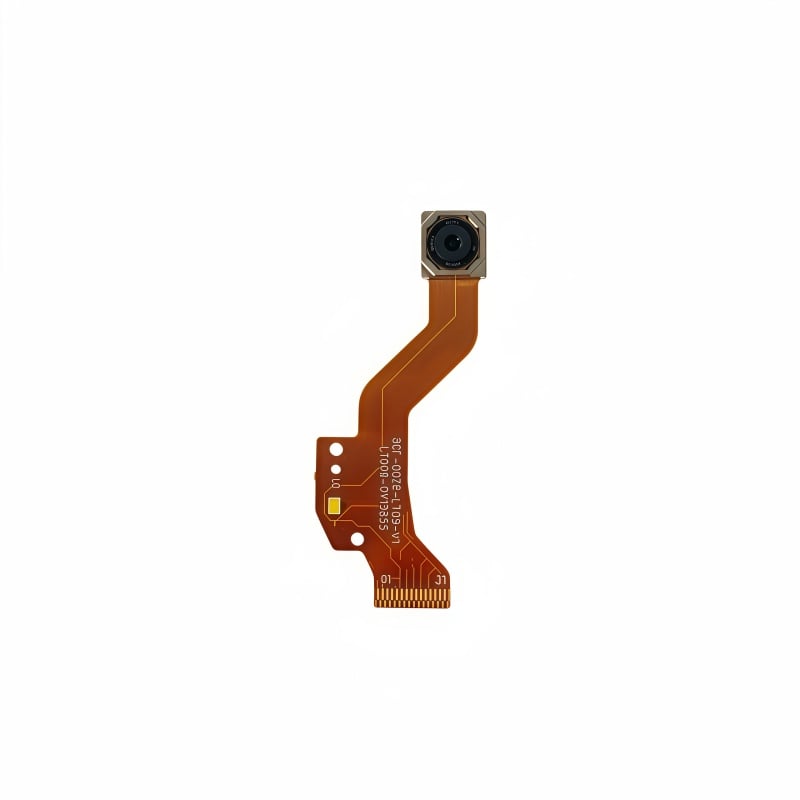
Autofocus camera modules rely on precise mechanical and electronic coordination to maintain sharp image capture across varying focal distances. When this system becomes stuck, the lens mechanism fails to respond to autofocus commands, resulting in blurred frames and unreliable image quality. The problem can originate from hardware contamination, firmware conflicts, driver issues, or mechanical wear. Identifying which layer of the autofocus system is malfunctioning—whether mechanical actuator, control circuitry, or software driver—is essential for selecting the right repair approach.
Understanding Autofocus Camera Modules Architecture
Mechanical Components in Autofocus Camera Modules
Autofocus camera modules contain precision-engineered mechanical parts that enable focus adjustment. The voice coil motor (VCM) drives the lens element back and forth along the optical axis, while mechanical guides ensure smooth, accurate movement. When autofocus camera modules experience sticking, the mechanical pathway is often the first suspect. Dust particles, corrosion, or lubricant breakdown can prevent smooth actuator travel, causing the autofocus system to freeze mid-cycle. Additionally, physical shock or thermal stress may bend internal guides or damage the motor coil, rendering autofocus camera modules unable to complete focus adjustments.
Electronic Control Systems in Autofocus Camera Modules
The electronic subsystem of autofocus camera modules includes the AF driver IC, sensor interface circuits, and communication protocols. These components coordinate lens movement based on image analysis feedback. When autofocus camera modules fail electronically, the driver IC may hang during operation, the sensor may stop reporting focus data, or communication between the host and autofocus module may break. Voltage fluctuations, electromagnetic interference, or thermal throttling can compromise the electronic control pathway. Understanding this interaction between mechanical and electronic layers is critical when troubleshooting autofocus camera modules issues.
Systematic Diagnostic Procedures for Stuck Autofocus
Initial Electrical and Firmware Checks
Begin troubleshooting stuck autofocus camera modules by verifying power supply integrity. Use a multimeter to confirm that the autofocus camera modules receives stable voltage within manufacturer specifications—typically 2.8V to 5V depending on module design. Check that ground connections are secure and exhibit low resistance. Next, examine firmware or driver versions controlling the autofocus camera modules. Outdated or corrupted firmware commonly causes autofocus camera modules to hang during initialization or mid-focus cycle. Update the autofocus camera modules firmware to the latest stable release, and ensure the host device driver matches the current module specification. Many autofocus camera modules issues resolve after firmware synchronization between the camera module and host system.
Mechanical Inspection and Cleaning
Physical inspection of autofocus camera modules reveals contamination and mechanical damage. Under magnification, examine the lens assembly and actuator assembly for visible dust, particles, or dried lubricant. If your autofocus camera modules design permits non-destructive inspection, gently tap the module to check for loose internal components—a rattling sound indicates mechanical play. For stuck autofocus camera modules, carefully apply compressed air at low pressure around the lens barrel to dislodge surface dust. Avoid high-pressure air streams, as these may drive particles deeper into the autofocus camera modules mechanism. If the autofocus camera modules remains unresponsive after cleaning, the issue likely involves internal mechanical binding or electronic failure rather than surface contamination.
Resolving Common Autofocus Camera Modules Failures
AF Driver IC Lockup and Recovery
The AF driver IC sometimes enters a fault state where it ignores autofocus commands and holds the lens in a fixed position. When autofocus camera modules display this behavior, the first recovery step is a controlled power cycle. Remove power from the autofocus camera modules for 10–30 seconds, allowing all capacitors to discharge fully. This reset clears transient errors and often restores normal autofocus camera modules operation. If the issue persists, check the AF driver IC datasheet for specific reset procedures. Some autofocus camera modules support a dedicated reset pin or I2C register command that forces the driver to reinitialize. Sending this reset command through the camera interface can resolve autofocus camera modules hangs caused by firmware loops or sensor feedback failures.
Autofocus Camera Modules Mechanical Stalling Solutions
When autofocus camera modules mechanics become stuck mid-travel, the lens actuator may encounter excessive friction or reach a mechanical limit. For stuck autofocus camera modules, examine the firmware for focus range settings—an incorrectly configured minimum or maximum focus distance may cause the autofocus camera modules to attempt focusing beyond mechanical limits, triggering a stall condition. Adjust the autofocus camera modules firmware parameters to enforce realistic focus boundaries. In severe cases where autofocus camera modules mechanics are genuinely bound, thermal cycling may temporarily free the stuck autofocus camera modules. Raise the ambient temperature around the autofocus camera modules unit by 5–10 degrees Celsius to expand internal components slightly, sometimes relieving mechanical friction. However, this approach is temporary; replacement is necessary if autofocus camera modules remain stuck after thermal cycling.
Communication Protocol Failures in Autofocus Camera Modules
Autofocus camera modules communicate with host systems through MIPI CSI-2, USB, or proprietary interfaces. Signal integrity problems on these buses prevent the host from sending focus commands to the autofocus camera modules. Verify that bus termination resistors are correctly installed and that cable shielding is intact. Oscilloscope measurements of the autofocus camera modules interface lines can reveal signal quality issues. If autofocus camera modules show normal power but no response to commands, check the host device driver logs for error codes specific to the autofocus camera modules subsystem. Many autofocus camera modules issues trace to driver timeout errors or protocol negotiation failures—updating the host-side driver often resolves these communication problems.
Prevention and Long-Term Reliability
Operational Best Practices for Autofocus Camera Modules
Protecting autofocus camera modules from failure requires thoughtful deployment strategy. Shield the autofocus camera modules module from dust accumulation by using protective windows or housing filters rated to the optical specifications of your autofocus camera modules. Avoid rapid temperature cycling near the autofocus camera modules, as thermal stress accelerates mechanical wear and can cause firmware instability. Implement regular firmware update cycles for your autofocus camera modules systems to benefit from bug fixes and performance improvements released by manufacturers. When integrating autofocus camera modules into products, provide adequate power filtering and electromagnetic shielding to prevent electrical noise from disrupting the AF driver IC.
Maintenance Schedules for Industrial Autofocus Camera Modules
Industrial deployments of autofocus camera modules benefit from preventive maintenance intervals. Depending on environment and duty cycle, inspect autofocus camera modules hardware every 6–12 months for signs of optical coating degradation, actuator friction, or cable strain. Document baseline focus performance metrics for your autofocus camera modules fleet—sudden deviations often signal imminent failure of specific autofocus camera modules units. Maintain spare autofocus camera modules modules as replacements to minimize production interruption. Store replacement autofocus camera modules modules in controlled environments with stable temperature and humidity, as environmental stress can degrade dormant autofocus camera modules components.
FAQ
Why does an autofocus camera modules suddenly stop responding to focus commands?
Sudden loss of autofocus response typically stems from firmware crashes, driver incompatibility, power supply instability, or mechanical jamming. Start by power-cycling the autofocus camera modules and verifying firmware version compatibility. Check power supply voltage stability with a multimeter. If the autofocus camera modules remains unresponsive, the AF driver IC may require a forced reset, or the mechanical actuator may be stuck and need thermal cycling or replacement.
Can firmware updates fix stuck autofocus camera modules issues?
Yes, many autofocus camera modules failures resolve after firmware updates. Outdated firmware in autofocus camera modules can contain focus-loop bugs or sensor-integration errors that cause hanging. Before attempting mechanical troubleshooting, always update the autofocus camera modules to the latest stable firmware release. Ensure the host system driver is also current and compatible with the autofocus camera modules version.
How can environmental conditions affect autofocus camera modules performance?
Dust, humidity, extreme temperature swings, and vibration all degrade autofocus camera modules reliability over time. Dust accumulation increases mechanical friction in the autofocus camera modules actuator, while temperature cycling stresses solder joints and mechanical connections. High humidity can corrode the autofocus camera modules AF driver IC traces. Deploy autofocus camera modules in controlled environments with filtered air intake, stable temperature ranges, and vibration isolation to maximize operational lifespan.